

The ability to generate a YouTube video transcript has revolutionized how we consume and repurpose video content. Whether you're a student reviewing lectures, a content creator building blog posts, or a researcher analyzing spoken content, having access to accurate YouTube video transcript tools can save hours of manual work and unlock entirely new workflows.
In 2026, the demand to get YouTube video transcript options has never been higher. Video continues to dominate online education, marketing, and communication, yet the ephemeral nature of spoken content often makes it difficult to reference, search, or reuse. This is where YouTube video transcript technology becomes essential—transforming fleeting audio into permanent, searchable text.
This comprehensive guide explores the top best YouTube video transcript tools available today, all of which are online, free to use, and powered by AI. Whether you need to extract YouTube transcript data for academic purposes, convert YouTube video to text for SEO optimization, or simply download YouTube transcript files for offline reference, you'll find the perfect solution here.
Understanding YouTube Video Transcript: More Than Just Subtitle
A YouTube video transcript represents the complete written record of everything spoken in a video. While superficially similar to subtitles, a YouTube subtitles transcript serves fundamentally different purposes. Subtitles are designed for real-time viewing, appearing briefly on screen before disappearing. In contrast, a YouTube video transcript exists as a permanent document—something you can read, edit, search, and repurpose long after watching the video.
The distinction matters because YouTube video transcription opens possibilities that subtitles cannot. You can scan a 2-hour lecture in minutes by reading its transcript. You can copy specific quotes without rewinding repeatedly. You can transform spoken content into written articles, study guides, or social media posts. Most importantly, a YouTube video transcript makes video content accessible to people who are deaf or hard of hearing, non-native speakers, or anyone who simply prefers reading to watching.
Why the Demand for YouTube Video Transcript Tools Continues Growing
The explosion of online video content has created an urgent need for efficient YouTube transcript generator free tools. Consider these real-world scenarios:
Learning and Education: Students worldwide rely on YouTube for supplemental education, from university lectures to coding tutorials to language lessons. Reading a YouTube video transcript allows learners to review material at their own pace, highlight key concepts, and create study notes without constant pausing and rewinding.
Content Creation and Repurposing: Digital creators face constant pressure to produce content across multiple platforms. A single YouTube video can become five blog posts, ten social media updates, and three newsletters—but only if you can efficiently get YouTube video transcript data to work with. Manual transcription would be prohibitively time-consuming; automated tools make this workflow practical.
SEO and Digital Marketing: Search engines cannot watch videos, but they excel at indexing text. By using YouTube video transcription to create searchable content, marketers improve discoverability and reach. Additionally, analyzing competitor videos through their transcripts reveals messaging strategies and keyword opportunities.
Research and Analysis: Academics, journalists, and market researchers increasingly rely on video as primary source material. To analyze this content systematically, they need to extract YouTube transcript data that can be searched, annotated, and cited. Video alone doesn't support these scholarly workflows.
Accessibility and Inclusion: Beyond legal compliance, providing a YouTube video transcript demonstrates commitment to inclusive design. Text alternatives ensure that video content reaches the widest possible audience, regardless of hearing ability, language proficiency, or viewing context.
How to Get YouTube Video Transcript: Built-in vs. AI-Powered Tools
YouTube itself offers basic transcript functionality for videos where creators have enabled it. Clicking the three-dot menu and selecting "Show transcript" reveals the official YouTube subtitles transcript. However, this built-in option has significant limitations: inconsistent availability, poor formatting, no paragraph breaks, and cumbersome copying for long videos.
This is why dedicated YouTube transcript online tools have become essential. These platforms use AI to automatically get YouTube video transcript data regardless of whether official captions exist. Modern AI video transcription free services can process audio in real-time, handle various accents and audio qualities, and deliver clean, formatted text ready for immediate use.
The best tools require only a YouTube URL—no downloads, no installations, and often no account creation. Within minutes, you have a complete, readable YouTube video transcript that would have taken hours to create manually.
Top 10 Best YouTube Video Transcript Tools for 2026
1. Audio Converter AI – Clean and Editable YouTube Video Transcript
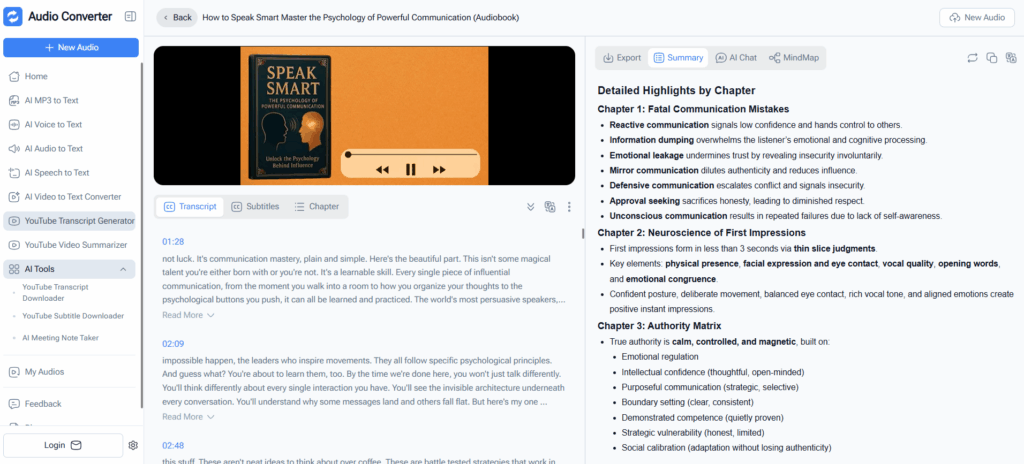
Audio Converter AI has earned its reputation as a leading YouTube transcript generator free by delivering clean, immediately usable transcripts with minimal effort. Simply paste a YouTube URL and receive a beautifully formatted YouTube video transcript within moments.
Key Features:
- Fully online with zero registration requirements
- Clean paragraph-based formatting that's ready to read and edit
- Handles videos of any length without usage restrictions
- Intelligent punctuation and natural text flow
Best for:
Students taking notes, bloggers repurposing video content, researchers extracting quotes, and anyone who needs a YouTube video to text conversion they can immediately work with.
2. NoteGPT – AI-Powered Learning from YouTube Video Transcript
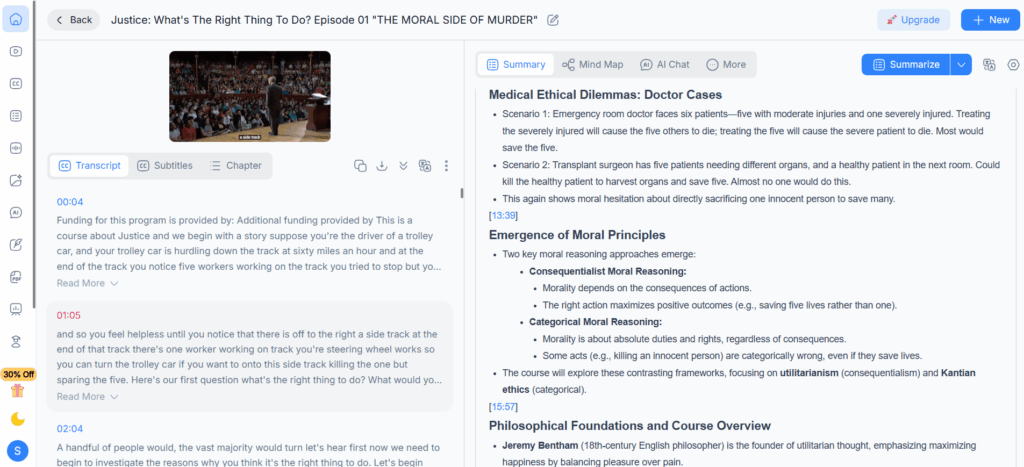
NoteGPT goes beyond basic transcription by transforming your YouTube video transcript into structured learning materials. The platform applies AI to identify key concepts, generate summaries, and highlight critical sections automatically.
Key Features:
- AI-powered summarization and key point extraction
- Timestamp synchronization linking transcript to video moments
- Structured note organization from raw YouTube video transcription
- Interactive interface for jumping between text and video
Best for:
Students reviewing lectures, self-directed learners studying tutorials, educators analyzing educational content, and anyone seeking to get YouTube video transcript data optimized for learning.
3. Decopy AI – YouTube Video Transcript with Built-in Rewriting
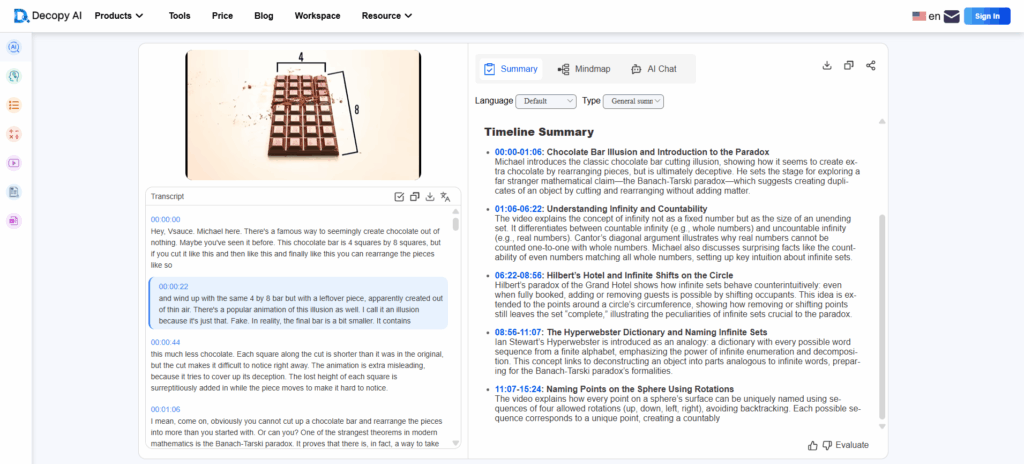
Decopy AI recognizes that many users extract YouTube transcript content specifically to repurpose it. The platform combines accurate transcription with AI-powered rewriting tools to transform spoken content into polished written material.
Key Features:
- Integrated AI rewriting and content optimization
- Converts conversational video language into professional prose
- Preserves original meaning while improving readability
- Free online access to both transcription and rewriting features
Best for:
Content creators building blog posts from videos, digital marketers repurposing content across platforms, copywriters seeking source material, and social media managers needing quick content adaptation.
4. VideoTranscriber AI – Specialized Long-Form YouTube Video Transcription
VideoTranscriber AI tackles the unique challenges of long-form content, maintaining transcription accuracy across hours of video. The platform excels at handling multiple speakers, varying audio quality, and extended recording sessions.
Key Features:
- Optimized for videos exceeding one hour in length
- Maintains consistent quality for webinars, podcasts, and lectures
- Multiple YouTube transcript download format options (TXT, SRT, DOCX)
- Robust handling of multiple speakers and audio variations
Best for:
Academic researchers transcribing lectures, podcast producers creating show notes, business professionals documenting webinars, and journalists working with long-form interview content.
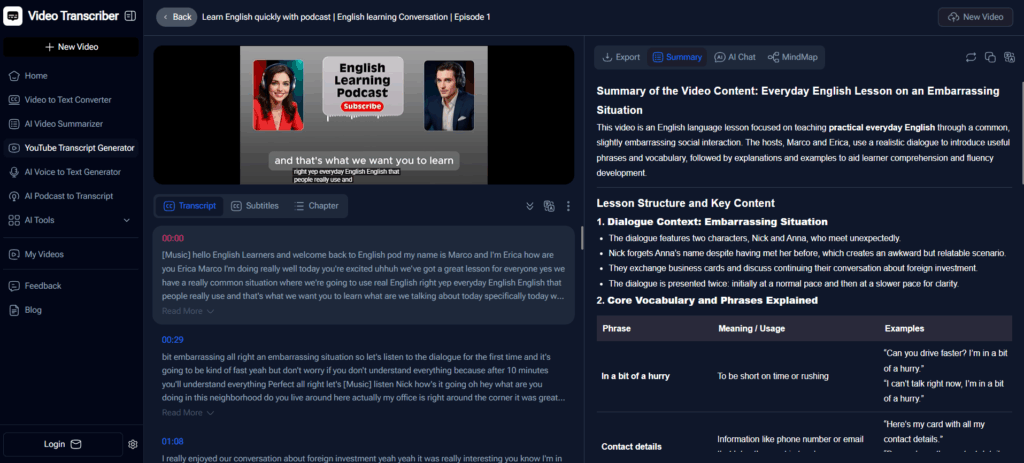
5. YouTubeToTranscript.com – Lightning-Fast Transcript Extraction
YouTubeToTranscript.com strips away complexity to focus on pure speed. This YouTube transcript online tool delivers text in seconds, making it perfect for users who need quick access without advanced features.
Key Features:
- Extremely fast YouTube video to text processing
- Zero learning curve with minimalist interface
- Instant copy-paste functionality
- No account creation or feature overload
Best for:
Journalists on tight deadlines, students quickly reviewing lecture sections between classes, professionals needing specific quotes, and anyone requiring immediate transcript access.
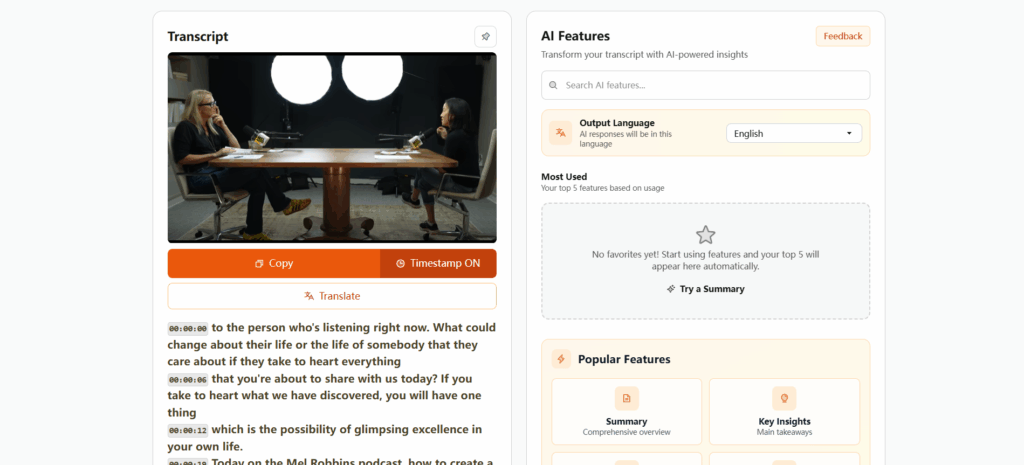
6. DownSub – Extract Existing YouTube Subtitles Transcript
DownSub takes a different approach by extracting and formatting existing subtitle files rather than transcribing audio. When videos have professional captions, this method delivers perfect accuracy with preserved timing information.
Key Features:
- Extracts official YouTube subtitles transcript data with 100% accuracy
- Supports multiple download formats (SRT, VTT, TXT)
- Maintains timestamp information for subtitle editing
- Instant processing since it uses existing caption files
Best for:
Video editors working with caption files, content creators needing exact official transcripts, subtitle translators, and users who prefer verified caption accuracy over AI transcription.
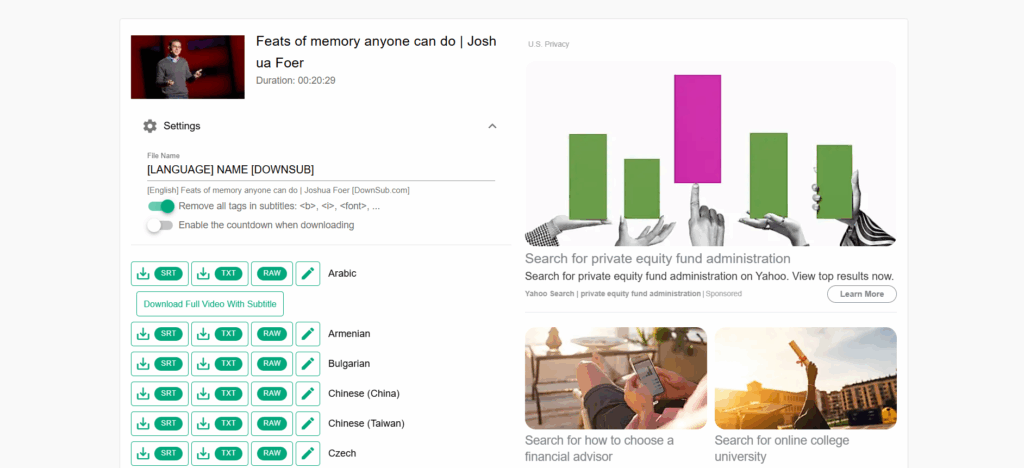
7. SaveSubs – Multilingual YouTube Video Transcript Downloads
SaveSubs removes language barriers by enabling users to get YouTube video transcript data in multiple languages. The platform supports both official translations and community-contributed captions across dozens of languages.
Key Features:
- Access to multilingual YouTube video transcript versions
- Support for official and community-contributed translations
- Simple language selection interface
- Free downloads in multiple text formats
Best for:
Language learners reading along with foreign content, translators working on localization projects, international educators, and global content researchers analyzing videos across languages.
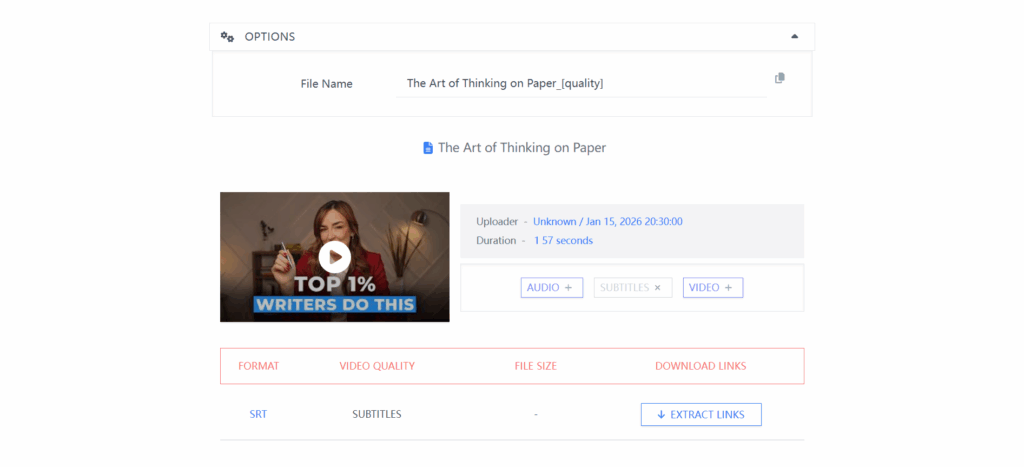
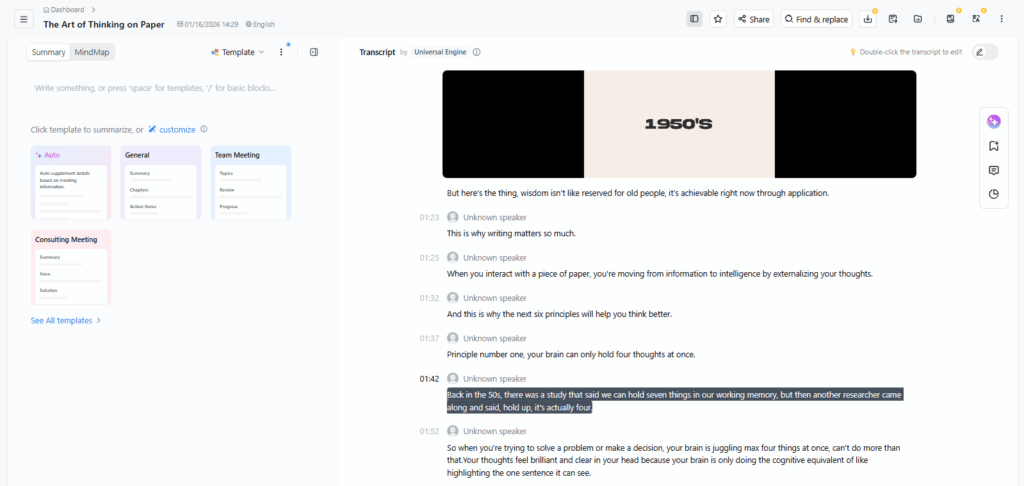
8. Notta – Organized YouTube Video Transcript Management
Notta combines YouTube video transcription with comprehensive content management, allowing users to organize, tag, search, and revisit multiple transcripts efficiently within a unified workspace.
Key Features:
- Cloud-based transcript library with search functionality
- Tagging and categorization for multiple projects
- Easy return access to previously transcribed videos
- Clean reading interface with editing capabilities
Best for:
Academic researchers managing multiple video sources, students organizing semester-long lecture transcripts, content teams collaborating on video research, and professionals building knowledge bases.
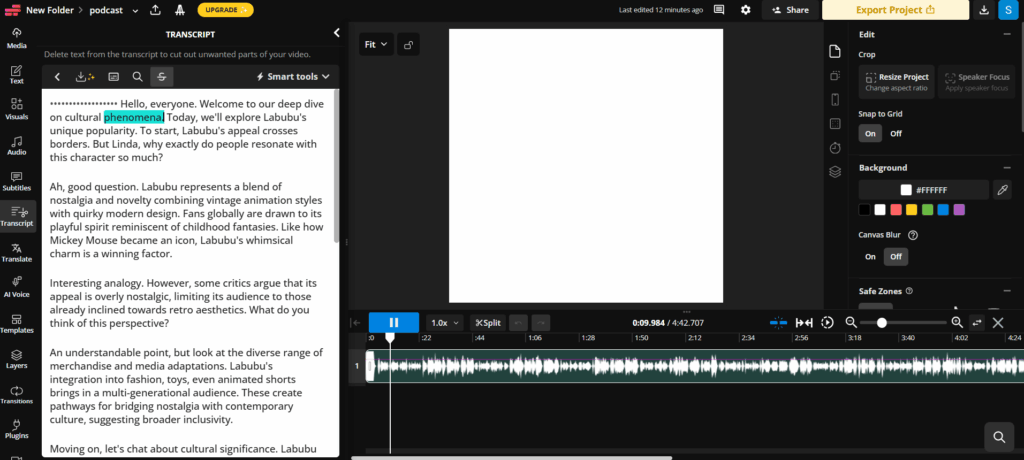
9. Kapwing – YouTube Video Transcript for Caption Creation
Kapwing bridges the gap between transcription and video editing, allowing users to extract YouTube transcript data and immediately apply it to subtitle creation, caption editing, and clip selection workflows.
Key Features:
- Visual editor showing transcript alongside video frames
- Direct subtitle creation from YouTube video to text output
- Timeline synchronization for caption timing adjustments
- Integrated video editing tools for content repurposing
Best for:
Video editors creating subtitles, social media managers repurposing clips for Instagram and TikTok, content creators adding captions to video content, and teams producing accessible video materials.
10. VEED – Transcript-Based Video Editing Interface
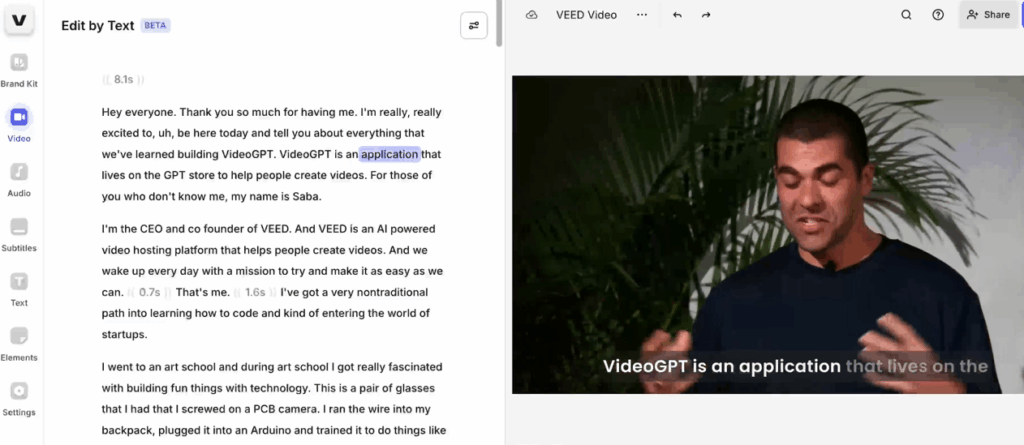
VEED introduces an innovative approach where you can edit video by editing the YouTube video transcript. Delete transcript paragraphs to remove video sections, making complex editing accessible to non-technical users.
Key Features:
- Text-based video editing using transcript content
- Automatic scene identification linked to transcript sections
- Quick clip extraction by selecting transcript text
- Combined YouTube transcript download and video export options
Best for:
Content creators repurposing long videos into highlights, marketers extracting key moments for promotional clips, podcasters creating video snippets for social media, and anyone seeking simplified video editing workflows.
Selecting Your Ideal YouTube Video Transcript Tool
With so many excellent options available, choosing the right YouTube transcript generator free tool comes down to understanding your specific workflow and priorities. There's no universal "best" solution—only the best fit for your particular needs.
Match Your Tool to Your Workflow:
If you're a student or educator focused on learning, NoteGPT's AI-powered summarization turns raw YouTube video transcript data into organized study materials. The ability to highlight key concepts and jump between video moments makes comprehension significantly easier.
If you're a content creator or marketer who needs to repurpose videos into blog posts, social media content, or newsletters, Decopy AI's integrated rewriting features streamline the entire process. You'll spend less time editing and more time creating.
If you're a researcher or professional working with long webinars, podcasts, or multi-hour lectures, VideoTranscriber AI's specialized long-form transcription ensures consistent quality throughout extended content without sacrificing accuracy.
If you need quick, clean text without complications, Audio Converter AI delivers beautifully formatted YouTube video to text conversions that require minimal editing. It's the reliable choice when you simply need readable transcript content fast.
If you're constantly on deadline and need instant access, YouTubeToTranscript.com's lightning-fast processing gets you transcript text in seconds—perfect for journalists, students between classes, or anyone who can't wait.
Consider Combining Tools:
Many experienced users don't rely on a single platform. Instead, they strategically combine tools based on each task. Audio Converter AI works excellently as an everyday solution for most YouTube video transcript needs, while you might switch to VideoTranscriber AI when tackling a 3-hour conference recording, or turn to Decopy AI specifically when repurposing content for your blog. Some users keep Audio Converter AI as their go-to tool for clean, readable transcripts and use specialized platforms for particular scenarios like multilingual content or subtitle editing.
The key is recognizing that different situations call for different strengths. A tool perfect for extracting YouTube transcript quotes might not be ideal for generating study notes. Understanding these distinctions helps you work more efficiently and get better results from every YouTube video transcript you create.
Frequently Asked Questions About YouTube Video Transcript Tools
1. What is a YouTube video transcript used for?
A YouTube video transcript helps you read or study video content, take notes, conduct research, improve accessibility, or repurpose content for blogs, social media, or presentations. Tools like AudioConverter AI and Video Transcriber AI can make this process fast and easy.
2. Can I get a YouTube video transcript for free?
Yes. Many online tools allow you to generate YouTube video transcripts for free, often without needing to sign up. Tools such as Video Transcriber AI offer unlimited free usage for quick transcription.
3. Are AI-generated YouTube video transcript accurate?
Most AI-generated transcripts are highly accurate, especially for videos with clear audio. Some minor edits may be needed for specialized terms, multiple speakers, or background noise.
4. Can I download a YouTube video transcript as text?
Yes. Many tools let you download transcripts in TXT or SRT formats for offline reading, captioning, or content repurposing.
5. Is it safe to use online YouTube video transcript tools?
Reputable online tools process your data securely, often using encryption, and handle content responsibly. Your videos and transcripts are typically not stored permanently, reducing privacy risks.
Conclusion
The YouTube video transcript has evolved from a nice-to-have accessibility feature into essential digital infrastructure. As video continues dominating online communication, the ability to get YouTube video transcript data efficiently determines how effectively we can learn from, repurpose, and build upon video content.
Free, AI-powered YouTube transcript generator free tools have democratized access to this capability. What once required expensive transcription services or hours of manual work now happens automatically in minutes. Among the available options, Audio Converter AI stands out for users prioritizing simplicity and clean output, while specialized tools serve more specific workflows.
By selecting the right YouTube video transcript platform for each use case—whether that's Audio Converter AI for everyday transcription, VideoTranscriber AI for long-form content, or Decopy AI for content repurposing—you can unlock significantly more value from YouTube's vast content library without additional cost or complexity. The ability to efficiently convert YouTube video to text isn't just convenient—it's a fundamental digital literacy skill that ensures valuable spoken content remains accessible, searchable, and reusable long after the video ends.